Hidden Program In Windows XP
Go to Start>Run. Type in eudcedit - this will open up a font editor - allowing you to design your own custom fonts and characters to be used in things like MS Word.

Wednesday, November 29, 2006


Tuesday, November 28, 2006
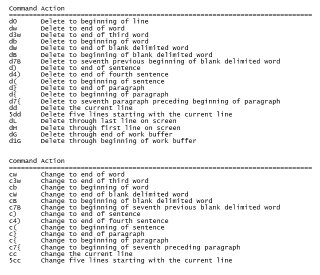
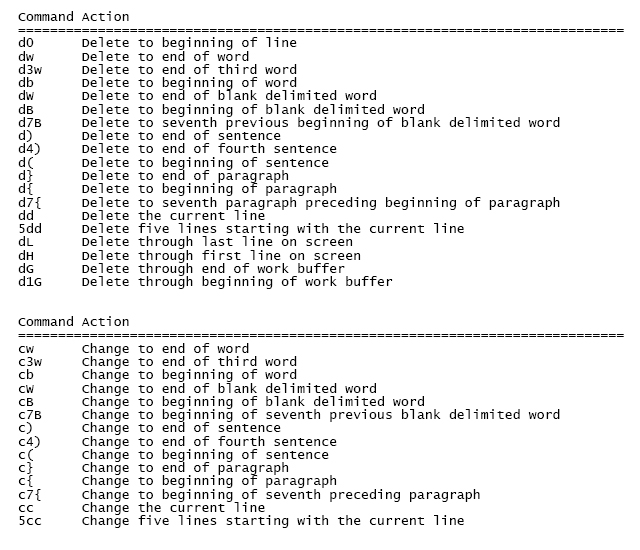
Common 'nix vi commands
These are some commonly used commands that can be used from within the vi editor in any UNIX or Linux based operating environment. Sorry for the jpg, but if people want to use these commands, I'd rather see them type the commands in then just copy/paste from here. :)
Wednesday, November 22, 2006
Moving pictures or images in Word
This tutorial covers documents that are already made with pictures and assumes you would like to replace an image with another image.
- Click on the image you are replacing and delete it.
- Go to the menu and.. Insert>Picture>From File...
- Select your new picture and insert it.
- Once the new picture lands on the page, resize it if you like. Make sure you don't deselect the image by accident. If you do then you will probably have to do these steps again.
- Go to the menu and.. Format>Picture... then select the 'layout' tab.
- Select the 'tight' option and click on the 'advanced...' button.
- Deselect all checkboxes under the 'Options' section and click ok.
- You should now be able to move the picture to anywhere on the page.
Monday, November 20, 2006
My new and improved XBox
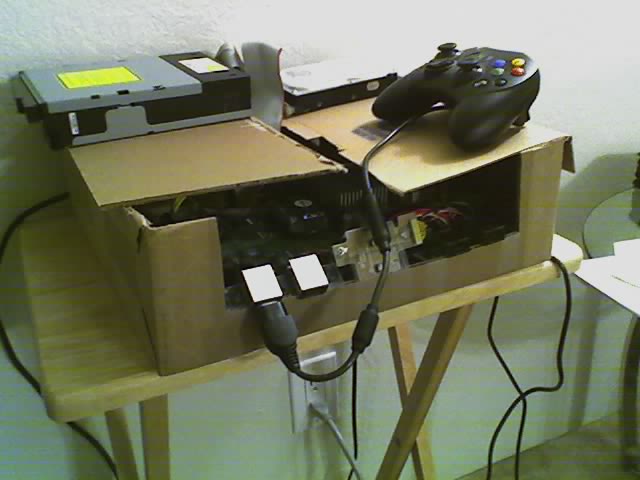
Not sure exactly what was wrong with it, but something funny was going on with the power. I'd plug it in and it would go on and off in a sort of timed fashion. Could see the fans go, the led's light up, but the drives weren't getting any power. So I removed everything from the case, laid it out flat and connected it all together and it works. So since it's nearly impossible to reassemble it back into the xbox case, I just laid it out in cardboard box. A cut here and there and some tape and I Macgyvered it back to life.
Friday, November 17, 2006
Subscribe to:
Posts (Atom)